dsh-width
> DeepSeek Harness 的界面插件:在 设置 → 显示 中新增两个滑杆,分别调节输入框与内容展示区的宽度百分比,全部即时生效、持久化保存。 > > A UI plugin for the DeepSeek Harness: adds a Settings → Display page with two sliders to adjust the width percentage of the input box and the content area, applied live and persisted.

功能
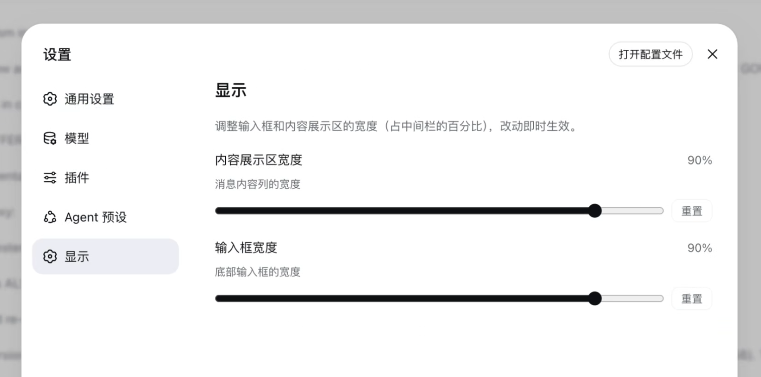
| 滑杆 | 效果 |
|---|---|
| 内容展示区宽度 | 调整消息内容列的宽度(占中间栏的百分比,--dsh-chat-content-width) |
| 输入框宽度 | 调整底部输入框(composer)的宽度(占中间栏的百分比,--dsh-composer-card-max-width) |
- 范围 30% – 100%,步进 5%,默认 100%;
- 每个滑杆带「重置」按钮,一键恢复默认;
- 改动即时生效,无需刷新;
- 数值持久化在
~/.dsh/settings.yaml的dsh-width一节。
安装
# 从 GitHub 安装(发布后)
dsh plugin --profile web add https://github.com/Hanice404/dsh-width/archive/refs/heads/main.tar.gz

# 或从本地目录(开发调试)
dsh plugin --profile web add link:/path/to/dsh-width
> 也可以直接在 profile 目录用 pnpm 安装: > > ``bash > cd ~/.dsh/profiles/web && pnpm add /path/to/dsh-width > ``
安装后重启 dsh web(Ctrl+C 后重新运行 dsh web),使浏览器端加载新插件 bundle。
暴露设置命名空间(仅旧版 DSH 需要)
> DSH 0.1.0-rc.7 及以后已移除 WEB_SETTINGS_NAMESPACES 白名单,插件通过 settings.register() 注册的命名空间会自动暴露给浏览器,无需任何额外步骤,重启即可使用。
仅在 0.1.0-rc.6 及更早版本上,浏览器可读写的设置命名空间被硬编码在 dsh-host-apiproxy 的 WEB_SETTINGS_NAMESPACES 白名单里,需要执行一次幂等补丁:
npm run expose # 等价于 node scripts/patch-apiproxy.mjs> 该脚本在新版 DSH 上会检测到「无白名单」并直接成功退出(无害)。执行后再次重启 dsh web。
使用
打开 设置 → 显示,拖动滑杆:
- 内容展示区宽度:调整消息列宽度;
- 输入框宽度:调整底部输入框宽度。
所有改动即时生效。
工作原理
- 节点端(
lib/index.js):注册dsh-width设置命名空间(两个百分比字段,默认 100),值持久化到~/.dsh/settings.yaml。 - 浏览器端(
lib/client.js):
- 通过 ctx.settingsScope.bind 订阅设置,变化时实时套用宽度; - 在 settings.section 槽位注册独立设置页「显示」(与「模型 / 插件 / Agent 预设 / 文件提及」并列); - 用稳定的 [data-conversation-scroll] 属性选择器(不依赖哈希类名)覆盖 --dsh-chat-content-width(消息列)与 --dsh-composer-card-max-width: 100%(composer 栈全宽),并直接覆盖 [data-composer-card](输入框)的 max-width 为 input%——两个百分比都相对中间栏,输入框与消息列宽度一致(若栈保持内置 780px,输入框的百分比会相对 780px,导致输入框明显窄于消息列); - 新会话(hero)页面:工作区 / 模式选择菜单行的左边缘通过 JS(MutationObserver + rAF)精确对齐到输入框左边缘——偏移量基于该行的原始(无 margin)位置计算,多次重新对齐结果稳定(刷新、DOM 变化、窗口缩放后位置不变),且只移动这一行,不改变任何其他元素的布局; - 会话中的任务列表(TodoPanel)宽度通过 JS 实时同步为输入框的实际宽度(px),两者始终保持一致。
常见问题
| 现象 | 原因与解决 |
|---|---|
| 设置页滑杆是禁用状态 | 旧版 DSH(≤rc.6)命名空间未暴露:运行 npm run expose 并重启 dsh web |
| 设置值存到哪里 | ~/.dsh/settings.yaml 的 dsh-width 一节 |
| 滑杆范围 / 默认值如何改 | 同时改 lib/index.js 的 schema 与 lib/client.js 的 MIN/MAX/STEP/DEFAULT |
兼容性
- 目标平台:DeepSeek Harness web(
dsh --profile web),版本0.1.0-rc.6及以后(rc.7+ 无需 expose 步骤); - 依赖:见
package.jsonpeerDependencies。
目录结构
dsh-width/
├── package.json          # 包清单 + dsh.client 注入配置
├── dsh.plugin.json       # 插件元数据清单
├── cordis.patch.yml      # bundle 组合补丁(loader 条目)
├── lib/
│   ├── index.js          # 节点端:注册 dsh-width 设置命名空间
│   └── client.js         # 浏览器端:设置页 + 宽度 CSS 注入
└── scripts/
    └── patch-apiproxy.mjs # 暴露命名空间到浏览器(仅旧版 DSH ≤rc.6 需要)
License
MIT